A Complete Ecosystem: From Code to Production, With the Same Method

Today I can build an application, test it on my machine, deploy it and run it in production using only projects that I maintain, and the container I tested is the same one that goes to production. I never planned an "ecosystem". It is the result of a method I have been repeating for more than twenty years, and this article tells where that method came from and how it works today.
It all started with an index.asp
It all started in the year 2000, when I worked at Unitech, an outsourcing company serving the government. I was part of the Research and Development group, and one of our missions was to validate whether .NET 1.0 was a good path to migrate from VB 6.0 to Web Forms. Unitech was a Microsoft partner, so we had access to the beta versions long before the release. We did the research, the tests and the proofs of concept, and we trained and followed a few teams.
The big change came when I was assigned to the SOMAR project (Sistema Organizado de Matrícula, the school enrolment system of the state of Bahia). Until then the system was 100% VB6 with Oracle 7.3 and stored procedures, but that year's public tender required a web version to be delivered, which was quite new at the time. I had already worked at a web design company and had written my own CGI in Delphi (CGI was the mechanism in which the web server ran a program on every request and sent back to the browser whatever that program wrote), so they put me on the project as Plan B. Plan A was to deliver the VB6 version, which was already done, and to have a web version only as a deliverable, with no expectation that it would be used.
We chose ASP 3.0, which came out in the same year as PHP 4, when both technologies were still very primitive: basically includes and commands to write text to the page, with a JavaScript that was also very limited. Even without the pressure of the delivery, I decided to create something that was easy for the developer and that hid the complexity of mixing HTML with code. I had already worked with ColdFusion and with CGI, and everything was very technical, with a steep learning curve.
I thought about how a C project is organized, with its main.c and its headers, and adapted the idea to our reality in ASP 3.0. Each page had its "headers" and a main function:
<!-- #include file="bancodedados.inc" -->
<!-- #include file="seguranca.inc" -->
<!-- #include file="menu.inc" -->
<!-- #include virtual="design.inc" -->   <% ' draws the layout and calls Main %>
<%
Sub Main
    ' what this page does: a listing, a calculation, a download
End Sub
%>
The includes held the code specific to each subject, such as connecting to the database or checking whether the user had permission, and the Main of each page ran only what that page was supposed to do. The one calling Main was design.inc: it drew the layout, that big box with a header, a menu and a footer, and knew at which point of it the page's result should appear. With this technique, and reusing the stored procedures that already existed, our team of four people delivered the web system, which ended up being the protagonist of the project and the first web system at Unitech. Later I refined the technique and replicated it in other projects of the company, with a huge gain in productivity.
XMLNuke and what it taught me
When I left Unitech I decided to invest in my own "framework". At that time Java massively spread the use of XML, which had its formatting layer, XSL. With the two of them I could isolate the data layer from the presentation layer. It was a tempting idea, and there were few options back then; in the CMS wave there were PHP-Nuke and PostNuke.
So I created XMLNuke. The classes you wrote produced XML, and an XSL processing layer transformed that XML into HTML. The first version was in ASP, a natural continuation of what I had done at Unitech, and the project has been registered on SourceForge since May 2002. In 2003 came the versions in Java, C# and PHP, all with the same way of programming. PHP was where I ended up investing, because ASP was far more limited and because I had decided to bet on Linux. The 2003 version ran on PHP 4, then it sat idle for a long time, and I only picked it up again with PHP 5, in 2006, which was the version that matured. XMLNuke was also my first open source code: it started in CVS, moved to SVN on SourceForge and, many years later, went to GitHub.
In a way XMLNuke anticipated what we do today with REST APIs and JSON, where the code produces data and the presentation lives in another layer. The difference is that JSON is much simpler and needs no framework to be read.
XMLNuke was a huge monolith that needed a specific directory structure to run. With it I learned that a framework cannot be monolithic or rigid, that it is easier to maintain several small, cohesive components than a system in which everything is coupled, because there a small change ends up breaking parts that had nothing to do with it, and that a standard specification and good documentation are as important as the code. I killed XMLNuke and carried the lessons with me.
Those lessons became smaller components. The components taught me how to reduce complexity and separate responsibilities, then they asked for Docker images to always run the same way, then they asked for automation to publish, and so on. In How I Manage 30+ Open Source Projects I told how this worked when there were two pillars, the PHP components and the Docker images. Since then DockNimbus, ByJG Docs MCP, Parolsh and the package repositories have joined, and the pieces now cover the whole path.
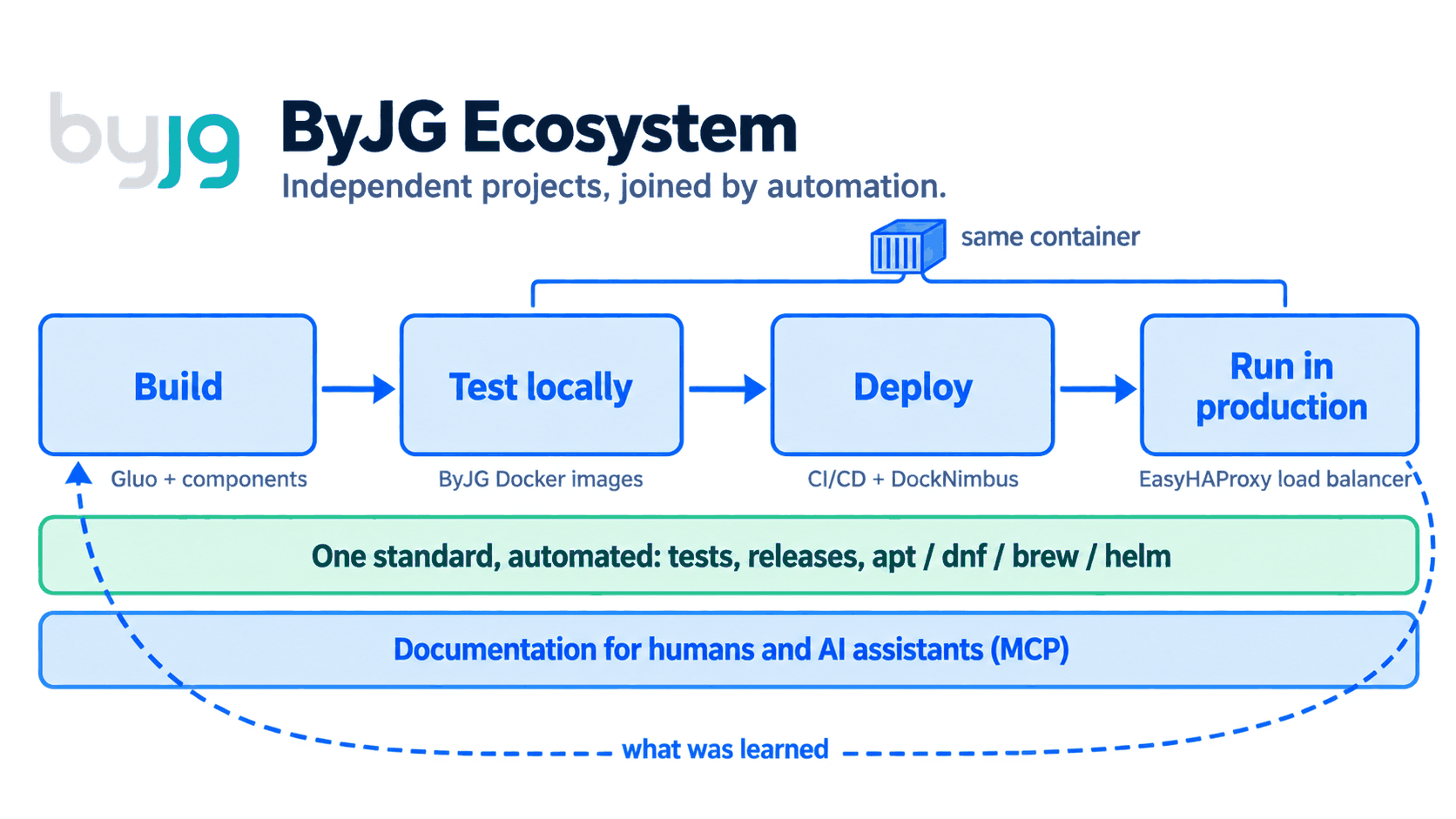
Build the application
After XMLNuke I was very reluctant to have a framework again. I kept only separate and completely independent components. The first ones I extracted from XMLNuke itself, back in my MaxMilhas days, and each of them took on a life of its own. Over time I noticed that, whenever I used those components, I followed the same methodology: my own way of writing and connecting the pieces.
First I recorded that way in the PHP Rest Reference Architecture, a reference architecture that defined the guidelines but still left a lot loose. It is what I used to build the KingPanda website (kingpanda.com.br). This year I finally turned the reference architecture into a framework called Gluo, which means "glue" in Esperanto, because that is what it does with my components.
A composer create-project byjg/gluo creates a REST API project that is yours, already with authentication, migrations, ORM, OpenAPI documentation and the test structure. It is the same idea as the index.asp of 2000: the developer writes the business rule and finds the rest already solved. Today Gluo runs BoletimDeUrna.com, the ByJG website (byjg.com.br) and the Brazilian postal code (CEP) lookup service that lives in it.
The difference from XMLNuke is underneath. Gluo glues together components that remain independent, such as RestServer, MicroOrm, Serializer, Migration and Config. Each one has its own repository, its own tests and its own release cycle, and can be used on its own in a Laravel or Symfony project. The part of the framework that evolves lives in vendor/ and is updated with a composer update, while the generated project can be changed freely.
Test locally with my own images
The project already comes with a docker-compose.yml, and a docker compose up -d brings up the API, the database and the frontend on my machine. The containers are built from the ByJG PHP images, which exist in CLI, FPM, Nginx and Apache variants for each PHP version. I do not need to install anything besides Docker.
Those images were born from an old pain: every time I switched machines I reconfigured PHP, extensions and tools, and something was always missing, besides needing several PHP versions at the same time. There was also the day I needed PHP 5.6 for an old project and the Linux distributions no longer shipped it.
shellscript.download comes from the same pain. With it I do not even need PHP installed: a load.sh php-docker -- 8.4 creates on my machine a php command that, underneath, runs inside the container, and I simply enter the project and work. To have another version side by side I repeat the command with another number. Node works the same way, and for Java and other tools there are scripts that do the installation with one command. I told the details in Easy PHP Development with Docker and VSCode.
An important point is the OpenAPI contract, which I write only once. The code itself documents each endpoint, with attributes above the controller method. A composer openapi extracts those attributes into an openapi.json file, and from then on the same file does four jobs: RestServer builds the API routes from it, Swagger UI serves the documentation pages where each endpoint can be tried out, the #[ValidateRequest] attribute validates the body of each request before the method runs and returns a 422 error when it does not follow the contract, and Swagger Test runs the contract tests, comparing each response with what was declared. Route, documentation, validation and test come from the same source, with nothing rewritten or duplicated.
Deploy: CI/CD and DockNimbus
The same pipeline that runs the tests builds the application image. For the pipelines I maintain k8s-ci, an image with the tools needed to build and deploy.
What was missing was the place to deploy to, and DockNimbus came out of that need. Having VMs in a cloud is practical and very fast, especially in large projects. In small projects, however, it is cheaper to rent a small dedicated server, connected to the internet and unmanaged, where all you get is the machine. Every time I had to configure the network, protect what would be exposed, install Kubernetes and so on, and when there was more than one machine the communication between them also went over the internet.
DockNimbus does that configuration for me, with the security standards I would apply by hand. It turns physical machines and VMs, from a Raspberry Pi to an x86 server, into a platform with compute, storage and Docker Swarm and K3s clusters, all declared in a single manifest, and it links the machines through a WireGuard mesh, so the traffic between them stays encrypted even when crossing the internet. The documentation sums up the difference from Kubernetes like this: Kubernetes answers "I have a cluster, how do I orchestrate containers on it?", and DockNimbus answers "I have machines, how do I turn them into a working platform?".
It works well for small installations, which is my case. I use DockNimbus to manage my local environment and my two ASUS Spark GB10 machines, and it also deploys to production the ByJG website, BoletimDeUrna and the documentation MCP server.
Production: the same Docker, with a load balancer
The image that runs in production is the same one I tested locally and that went through CI, so there is no difference between environments to investigate when something goes wrong.
In front of the applications sits EasyHAProxy. I like HAProxy a lot: it is very fast and also works at the TCP layer, so it can sit in front of a MySQL server, for example, and not only in front of web applications. Its configuration, however, is quite complicated. I wanted to automate it, and in 2018, when I started the project, the community version of HAProxy had nothing like it.
EasyHAProxy generates that configuration by itself. It discovers the services from Docker labels, Swarm services or Kubernetes Ingress, issues the TLS certificates and reloads HAProxy without dropping connections. DockNimbus itself uses EasyHAProxy as its load balancer.
Independent projects, centralized by automation
This is the point XMLNuke taught me the hard way. Each project has its own repository, its own tests and its own releases, and none of them depends on another to be published. What makes them an ecosystem is automation.
When a project is merged or tagged, automation publishes what it produces, with no manual step, and the documentation, the charts and the packages all go to the same site:
| What is published | How | How you install it |
|---|---|---|
| Documentation | add-doc reusable workflow | opensource.byjg.com |
| Helm charts | add-helm reusable workflow | helm repo add byjg https://opensource.byjg.com/helm |
| DEB and RPM packages | add-pkg reusable workflow, signed | apt install and dnf install |
| Homebrew formulas | a daily workflow in the tap follows the release tags | brew install byjg/tap/<formula> |
| Docker images | each project's build.yml | docker pull byjg/<image> |
| PHP components | a Git tag | composer require byjg/<component> |
The standard is the same in every project and is described in the Development Guidelines: nothing is published before the tests pass, releases are tags with semantic versions, and CI is written once and called by each project. The reasons are in Simple Principles to Avoid Overcomplicating the Complex.
Documentation for humans and for AI
The documentation lives in each project's repository, next to the code, and talks only about that project. Whoever documents MicroOrm writes about MicroOrm, without needing to know or describe the ecosystem. The complete documentation is generated by automation: on every merge the content of each project is copied to opensource.byjg.com, which assembles the whole site, and ByJG Docs MCP indexes the site with semantic and keyword search. Any assistant that speaks MCP queries that index and cites the page the answer came from.
This way the documentation is written once and gains two readers. An agent that needs to add persistence to a ByJG application finds MicroOrm and the intended way to use it, instead of inventing a data layer.
With XMLNuke I learned that specification and documentation matter. Today they are also the context the AI uses to work on my projects, and each documented change improves the next answer.
The shell and the agent in the same place: Parolsh
Parolsh was born for another reason. I prefer to work in the shell most of the time. When I want to see the logs of a pod, for example, I first have to list the pods and then run a kubectl logs for the first one, another for the second, the third, the fourth. Claude Code and Codex do this kind of investigation, but in them everything starts from natural language and the interface takes over the terminal, so the work ends up going entirely into the conversation and the shell becomes a supporting actor.
In Parolsh the two live in the same prompt. With !+kubectl get pods I run the command, see the result, and it already goes along with my next question. Then I ask for the logs, ask why the pods are restarting (what I would do with a describe) and can still ask for other analyses, which speeds up the process a lot. Parolsh runs inside the usual terminal, with no full-screen interface, and works with any ACP agent, such as Claude Code, Codex, Qwen Code and Gemini CLI.
The method, for anyone who wants to reproduce it
None of this depends on the ByJG tools. What I described is the result of a method that works for any set of projects:
- Automate what is repetitive. Tests, builds, releases, packages and documentation publishing run in CI.
- Centralize what is shared. One set of workflows, one documentation site, one set of base images.
- Isolate what is independent. Each component has its own repository, tests and release cycle, and only automation joins them.
- Use the same container in every environment. Development, CI and production run the same image.
- Write the documentation once, for two readers. Each project documents itself, and automation assembles the complete documentation. A person reads it on the site and an AI assistant reads it through MCP.
From index.asp to here
What I wanted in 2000 with an index.asp and half a dozen includes is what I still want: that the developer writes what the page does and finds the rest already solved. What changed was the size of "the rest", which today includes the local environment, the pipeline, the platform, the load balancer, the packages and the documentation the AI consults.
Each project still works on its own, and nobody needs to adopt everything. To start with an API, see Gluo. To put HTTPS in front of your services, EasyHAProxy. To turn machines into a platform, DockNimbus. To give context to your AI assistant, ByJG Docs MCP. The complete map is in The ByJG Ecosystem.